What is Company Onboarding?
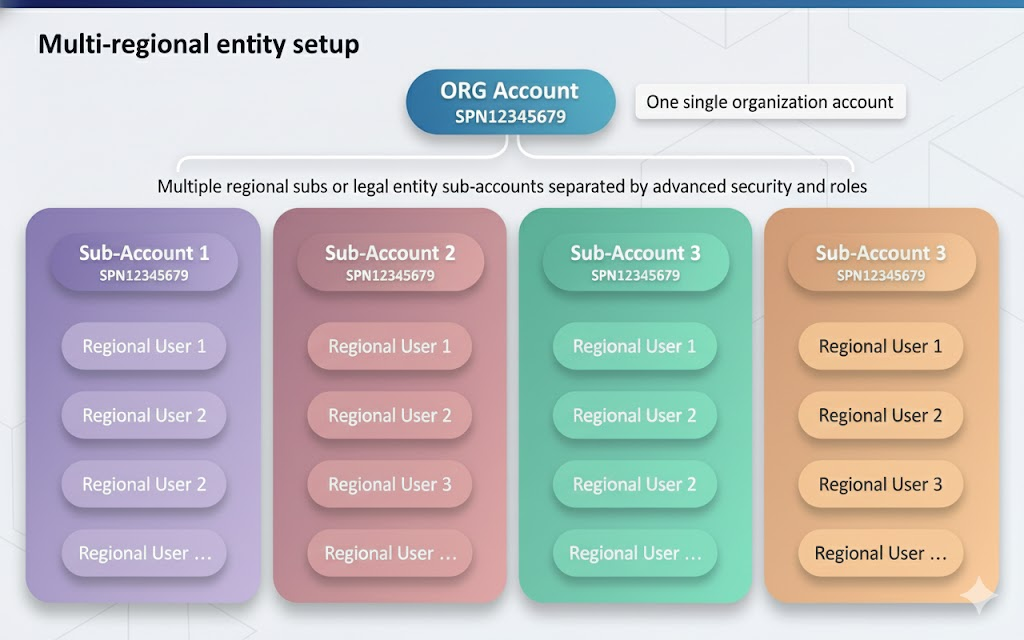
Xtrm operates as a global multi-tenant payment system. This architecture allows your company to operate under one global organization account while maintaining separate regional sub-account profiles for regional subsidiaries, legal entities, or team managers. This setup enforces global compliance and tax reporting while isolating regional operational funds.
Global Account Hierarchy & Roles
| Term / Role | Description | Access Level |
| Company Account | Global entity umbrella with a unique Organization ID (SPNXXXXXXXX). | Global Scope |
| Master Admin | Primary administrator responsible for global settings and entity setup. | 1 per Global Account |
| Controller Users | Administrators managing multiple regions, subsidiaries, or legal entities. | Multi-Regional Scope |
| Manager Users | Regional leads handling localized payment activities and wallets. | Regional Scope |
| Standard Users | Operational staff running specific incentive programs or payouts. | Restricted / Program Scope |
Company Registration Flow
Follow these core steps to establish your global account:
Registration Steps:
Registration Methods
Companies can register on Xtrm using one of three primary onboarding routes:
Direct Web Registration: Register directly via xtrm.com
Automated First Payment Onboarding: Accounts are created automatically when receiving an initial payout via API or mass payment file.
Single Sign-On (SSO) / Branded Portal: Enterprise clients can onboard via SAML/SSO or a custom branded URL (
yourco.xtrm.com).
Security & Regional Isolation
Wallet Isolation: Regional branches and sub-entities can only view and manage local wallets assigned to their operational scope.
Global Oversight: Central controllers and the Master Admin retain full auditing, currency conversion, and reporting visibility across all sub-accounts.
Multi-Currency Support: Companies can spawn unlimited currency wallets under a single account to manage separate department budgets or client balances.
Was this article helpful?
That’s Great!
Thank you for your feedback
Sorry! We couldn't be helpful
Thank you for your feedback
Feedback sent
We appreciate your effort and will try to fix the article