Overview
Entering accurate bank account details is essential for ensuring smooth transfers and withdrawals from your Xtrm wallet. If you have entered incorrect banking information—such as an invalid account number, routing number, or account holder name—you can easily edit or replace your bank account details directly in your account settings.
What Happens If a Transfer Fails Due to Incorrect Information?
Failed Transfer Notice: If a bank transfer is attempted with incorrect account details, the receiving bank will decline the transaction.
Returned Funds: The funds will automatically be returned and re-credited to your Xtrm wallet balance, minus any bank return fees incurred.
Update Required: You must correct or replace your bank account details before attempting another withdrawal.
How to Delete or Relink Bank Details
Log in: Go to xtrm.com and sign in to your account.
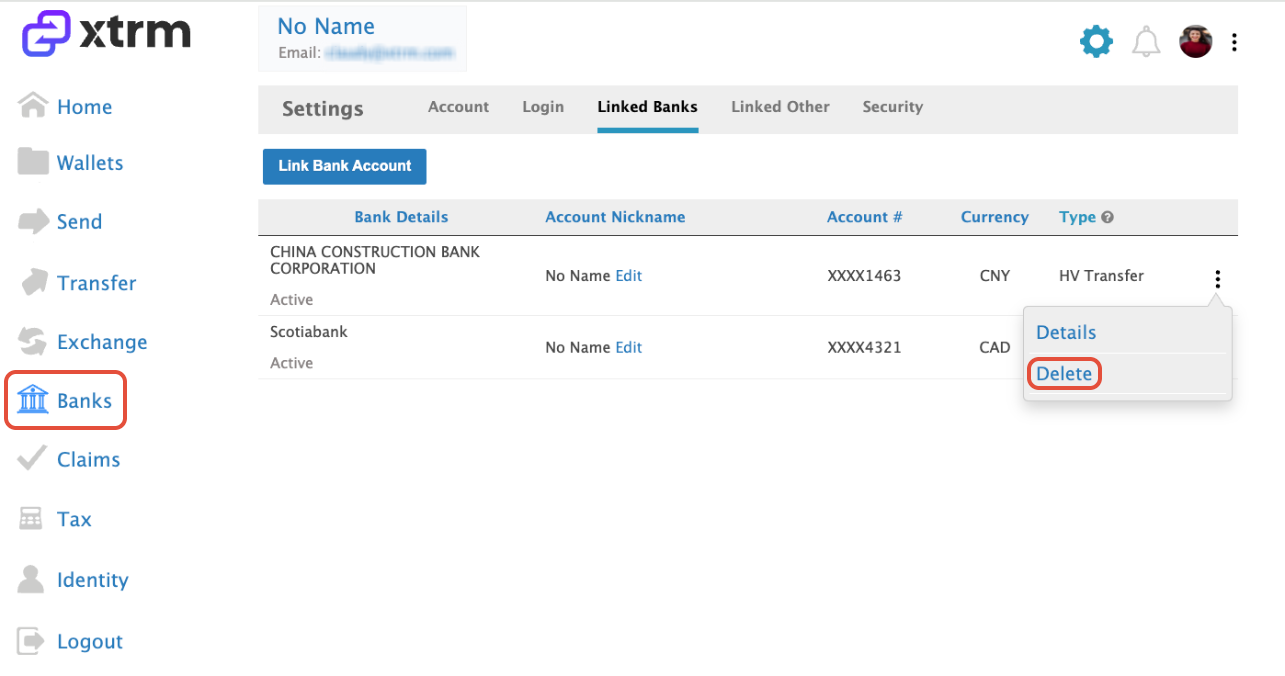
Click on Banks: Select Banks from the menu options.
Delete Incorrect Bank: Locate the incorrectly linked bank, click the ellipsis (⋮) icon next to it, and select Delete.
Add Correct Details: Click Add Bank to link your new, correct bank account information.
Resubmit Transfer: Once saved, return to Transfer or Send to re-attempt your transfer with the updated bank account.
Was this article helpful?
That’s Great!
Thank you for your feedback
Sorry! We couldn't be helpful
Thank you for your feedback
Feedback sent
We appreciate your effort and will try to fix the article