Overview:
This document outlines the relationship between a Remitter and a Beneficiary, specifically defining the transition from standard interaction to "Connected" status and the permissions enabled via Manager Services.
1. "Connected"
The differentiator in the platform is whether a Remitter is "Connected" to a Beneficiary. While standard features are available to any Remitter, Manager Services which allow high-level oversight into the Connected Beneficiary.
Being "Connected" is a prerequisite to allow the additional manager features
2. How to Connect to a Beneficiary (Individual or Company)
A Remitter becomes connected to a Beneficiary (Individual or Company) through the following five methods:
- API Creation: Remitter creates the company or user via API integration.
- UI Creation: Remitter creates the company or user manually via the User Interface.
- Branded Signup: Company is created via a specific branded signup flow (Note: Feature pending/coming soon).
- Initial Payment: The Remitter pays a company for the first time in a scenario where the company does not yet exist in the system.
- Admin Manual Link: A system administrator manually establishes the connection via Admin.
- This request can be sent over to support@xtrm.com or the Master Admin can submit a request using the interface to establish a connection between the Beneficiary (Individual or Company)
3. Standard vs. Manager Services
The below shows what is available by default Standard Services
| Action | Not Connected | Connected | Description |
|---|---|---|---|
| View Profile | Yes | Yes | Includes IDL, Master Admin Name, and Email |
| View Banks | Limited | Limited | Only shows banks linked by the Remitter. They do not show up to Beneficiary Conversely, banks linked by Beneficiary do not show up to Remitter |
| Link Banks | Yes | Yes | Limited view (see above) |
| View Wallets & IDs | Yes | Yes | Shows Wallet Name, Currency, ID, and whether it is the default wallet for that currency |
| View Wallet Activity | Limited | Limited | Only shows what the Remitter sent them using the Send function |
| View Users | Yes | Yes | Shows Name, Email, Access Level, and SPA number |
Manager Services (Requires Connection and Xadmin Activation)
These features are restricted until the Remitter is connected and the specific Manager Services is requested and enabled within Xtrm.
To enable this service or for more information please reach out to support@xtrm.com or partner@xtrm.com
4. Support & Activation
Connected manager services are reserved for manager-designated partners. If you require access to these advanced features to support your downstream customers, please reach out to your Account Manager or email partner@xtrm.com
5. Connection Established
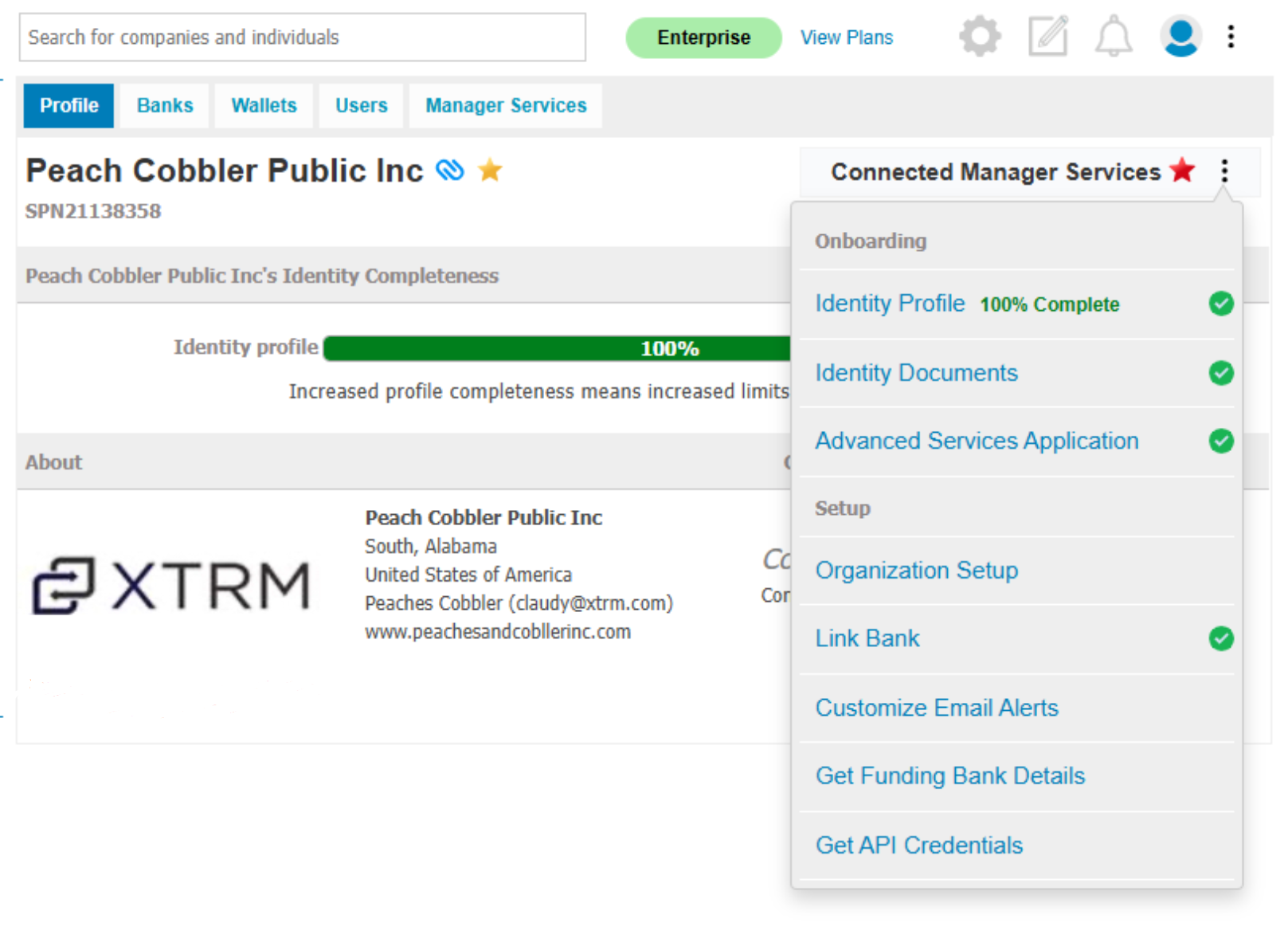
Once connected manager services are turned on for your organization account you will see a new menu labeled "Connected Manager Services" when viewing company contacts. This new menu provides features to support your downstream customers including:
- Onboarding Assistance: Help your customers get started.
- Account Configuration: Assist with setting up their accounts.
- Support Issue Resolution: Address support issues and transaction-related questions.
Please note that manager services will only be activated if you are Connected to the company. For more information on how to Connect please click HERE.
Was this article helpful?
That’s Great!
Thank you for your feedback
Sorry! We couldn't be helpful
Thank you for your feedback
Feedback sent
We appreciate your effort and will try to fix the article